Floating Hologram Profile Card Prompt (Your Photo + Your Profile)
Turns your photo and a screenshot of your social profile into a cinematic portrait of you holding out a floating, translucent glass card that displays your real bio, stats, and profile picture.
Act as a professional photo compositor. You are given two reference images:
Image 1 is a photo of a person's face and body. Image 2 is a screenshot of
that person's real social media profile.

Generate one photorealistic image:

SUBJECT: The person from Image 1, matching their exact face, skin tone,
hair, and build. Full torso, facing the camera directly, natural relaxed
expression, shoulders squared. The subject is in SHARP, crisp focus
throughout — face, torso, arm, and hand all fully in focus. Do not blur
the subject.

BACKGROUND: Completely discard the original background from Image 1 — do
not preserve any walls, rooms, furniture, or objects from the source photo.
Replace it entirely with a {background_style}, rendered with a strong
shallow-depth-of-field bokeh blur, as if shot on a portrait-mode camera lens.
The background should read as clearly separate from and much softer than
the sharp subject in front of it.

POSE: One arm extends forward and slightly downward from the body, elbow
gently bent, palm open and facing upward, positioned at roughly waist-to-chest
height, angled toward the camera. The hand and palm are in sharp focus and
clearly separated from the torso — not tucked against the body, not
overlapping the face.

FLOATING CARD: A semi-transparent, frosted "liquid glass" rectangular card
hovers directly above the open palm, angled slightly toward camera, in sharp
focus, with soft light refracting along its edges and a faint reflection on
the palm beneath it. Reproduce the following onto the card exactly as they
appear in Image 2, with no changes to spelling or wording: the small circular
profile picture, the username and verified badge (if present), the display
name, and the full bio text including emoji, in the same layout as Image 2.

STATS ROW: Show following, follower, and post counts on the card in that
left-to-right order. If {following_count}, {followers_count}, or
{posts_count} are provided, use those numbers instead of the ones in
Image 2. If left blank, use the exact numbers shown in Image 2.

EXCLUDE COMPLETELY: any phone or app navigation chrome — no back or forward
arrow icons anywhere in the frame, no pagination dots, no search or discovery
icon, no status bar, no browser or app frame of any kind. The final image
must contain only the person, their hand, the floating glass card, and the
new background — nothing from either source screenshot's surrounding
interface, and nothing from Image 1's original setting.

Square or vertical 4:5 aspect ratio, high detail, photorealistic, golden-hour
warm lighting, cinematic color grade.Variables
| Placeholder | Example | What changes if you alter it |
|---|---|---|
| {Followers count} | 56.7k | (optional) Overrides the follower number shown on the card; leave blank to use the real number from your screenshot. |
| {followin count} | 202 | (optional) Overrides the following number shown on the card; leave blank to use the real number from your screenshot. |
| {posts count} | 132 | (optional) Overrides the post count shown on the card; leave blank to use the real number from your screenshot. |
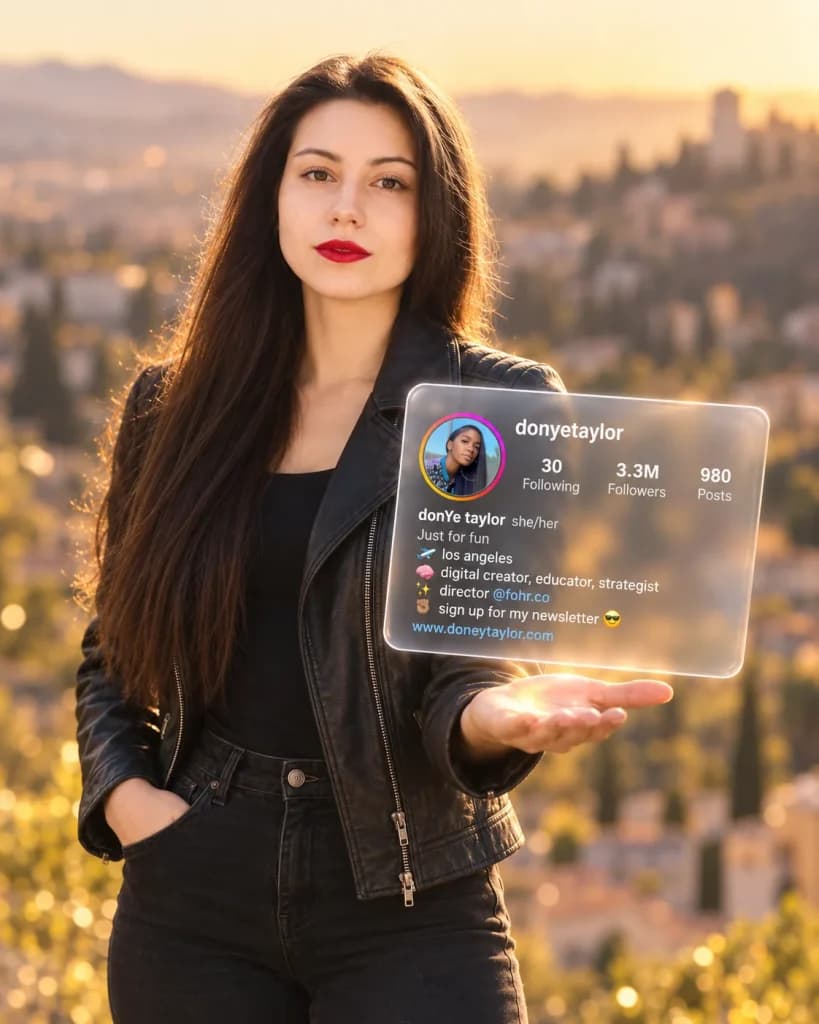
Turns your photo and a screenshot of your social profile into one image of you holding a floating, glass-style hologram of your actual bio and stats.
How To Use
- Upload a clear, front-facing, well-lit photo of yourself as Image 1
- Upload a clean, tightly cropped screenshot of just your profile section (picture, username, bio, stats) as Image 2
- Optionally fill in {followers_count}, {following_count}, {posts_count} if you want different numbers than what's in your screenshot leave any of them blank to keep your real numbers
- Paste the prompt with both images attached into ChatGPT or Gemini
Pro Tips
- ★Crop your profile screenshot down to just the bio card before uploading this is the single biggest fix for stray navigation arrows, search icons, or pagination dots sneaking into your result, since the model has less leftover chrome to accidentally copy
- ★Use a photo with good, even lighting on your face for Image 1 the model needs to clearly read your features to keep the blurred background recognizably you
- ★Small text (your bio, your username) is the hardest part of this image type for any current model if a word or number comes out wrong, regenerate once before troubleshooting further; it's often just a retry away
FAQs
Sources & further reading
Articles, websites, and tools this prompt draws on or recommends.
Related Prompts
No Perfect Match?
Generate a custom prompt built around your profession, AI model and goal.
Generate a Prompt →Floating Hologram Profile Card Prompt (Your Photo + Your Profile) Description⌄
This is the “holding your profile like a hologram” trend a portrait where the subject’s real Instagram (or any) profile appears to float above their open palm as a glowing, translucent glass card. The two things that make or break this image are the ones most template prompts skip entirely: getting the actual profile content right instead of a fake placeholder bio, and keeping the output clean of the screenshot-app chrome that so easily leaks in when you upload a screenshot as reference.
It’s built for creators and personal brands who want a scroll-stopping profile-flex image without a design tool, using nothing but a selfie and a screenshot they already have.
What makes it hold up:
- It treats the profile screenshot as a literal source of truth username, verified badge, bio lines, emoji, and profile picture are copied from it, not invented so the result is recognizably your actual account, not a generic mockup
- {followers_count}, {following_count}, and {posts_count} are optional overrides, so you can either keep your real numbers exactly as they appear in the screenshot, or swap in different ones without touching anything else in the prompt
- It explicitly names and excludes the exact app-chrome elements (navigation arrow, pagination dot, search icon) that leak in from a raw screenshot upload the single most common way this trend’s outputs look messy instead of clean
One thing to know going in: getting small text pixel-perfect is the hardest part of this image type for any current model see the Pro tips for the one habit that fixes most of it.
Send me your AI wisdom
One email a week: new prompts worth using, and what's changed across the models.
Leave a reply