Corporate Brand LinkedIn Profile Headshot Prompt (Your Face + Studio Backdrop)
Turns your photo into a studio-quality professional headshot confident crossed-arm pose, rolled-sleeve white shirt, solid color backdrop in the “corporate brand avatar” style built for LinkedIn.
Variables
{Background_color}Actual output, by model
Real output this exact prompt produced — not a description of what it might do.
Image: three-quarter framing, subject near-center, arms crossed waist-height with
one hand on opposite upper arm, open smile with teeth, white collared shirt with
sleeves rolled below elbow and top button open, black trousers visible at bottom
edge, solid dusty-rose-pink seamless background with soft gradient falloff, soft
frontal lighting with visible catchlights, no harsh shadows. Torso/shoulders read
closer to square-on than a clear 30-40° turn.
Image: three-quarter framing with clearer torso rotation and offset positioning
than the Gemini output, arms crossed, open smile, white collared shirt sleeves
rolled below elbow, open top button, black trousers barely visible at the very
bottom edge of frame, solid dusty-rose-pink seamless background with soft gradient,
soft frontal lighting, clean catchlights, no harsh shadows.
Which model runs this best
Both models produced strong, largely rule-compliant results correct outfit, background color, lighting, and pose elements across the board, with no invented props or background texture. Chat GPT came closer to the specified 30-40° torso rotation and off-center framing, while Gemini’s subject read as more square-on to the camera than the prompt’s “torso turned away, head turned back” instruction calls for; for this prompt, Chat GPT needed the least adjustment to match the written pose spec.
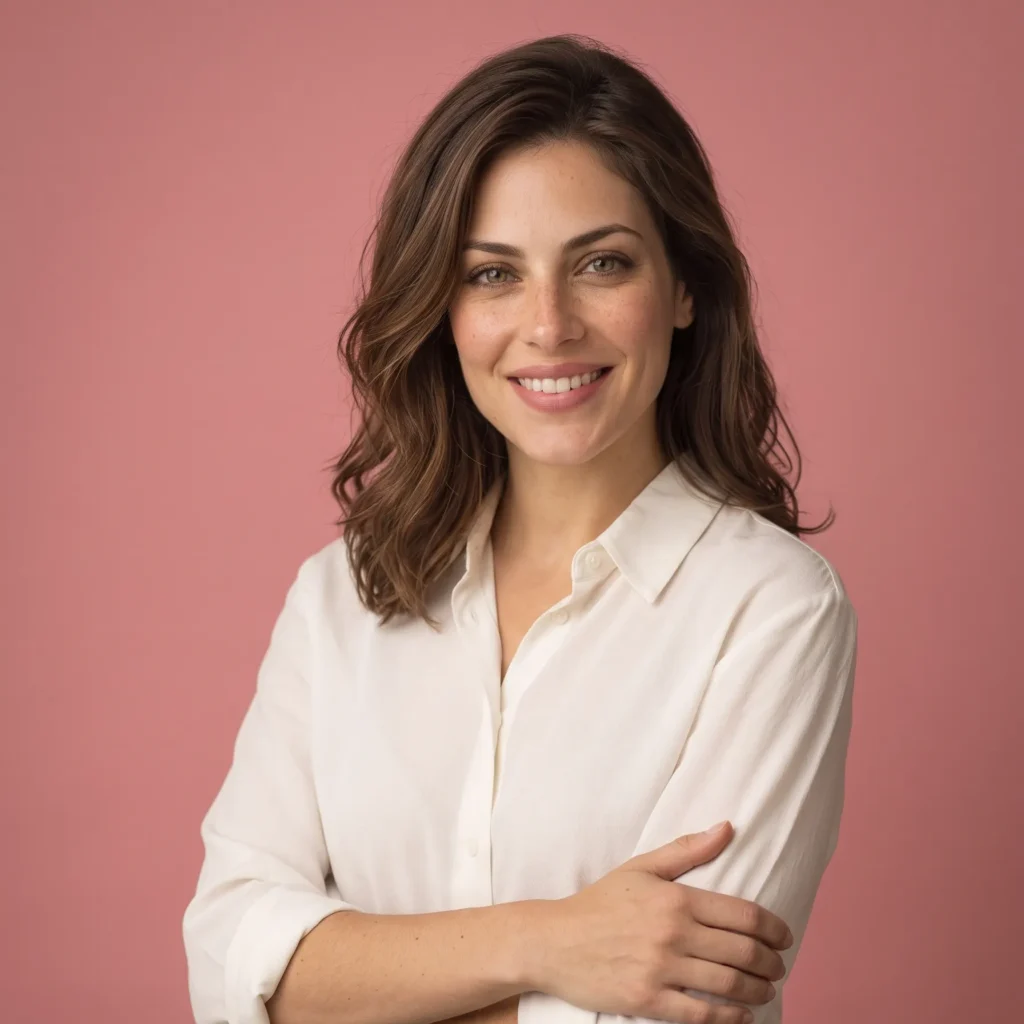
Turns one photo into a studio-quality corporate headshot confident crossed-arm pose, rolled-sleeve shirt, solid color backdrop for LinkedIn or any professional profile.
How To Use
- Replace {background_color} with your preferred backdrop (a brand color, or a neutral like “soft sage green” or “warm gray”)
- Attach a clear, well-lit, front-facing photo
- Paste into Chat GPT or Gemini
- Crop to a square before uploading as your profile photo LinkedIn and most platforms display photos in a circle, so check the crop before publishing
- 1.Formal dress and a genuine smile with teeth are the two single biggest factors research on profile photo perception points to for being seen as both competent and likable don’t swap the crossed-arm pose for a closed-mouth, overly posed look even if it feels more “serious”
- 2.If you need a specific brand hex code rather than a color name, FLUX.2 or Qwen Image will hold it more precisely than Chat GPT or Gemini
- 3.Treat an AI headshot as a strong temporary option, not a permanent one swap in a real photo when you’re able to, since some professional contexts still read a real photo as more credible long-term
FAQs
Sources & further reading
Articles, websites, and tools this prompt draws on or recommends.
Related Prompts



No Perfect Match?
Generate a custom prompt built around your profession, AI model and goal.
Generate a Prompt →Corporate Brand LinkedIn Profile Headshot Prompt (Your Face + Studio Backdrop) Description⌄
A real professional headshot costs money and a scheduled studio visit most people never get around to booking which is exactly why their LinkedIn photo is three years old, poorly lit, or missing entirely. This prompt rebuilds the specific formula that makes a corporate headshot actually work: a confident, open pose; relaxed-but-formal dress; and a clean solid-color backdrop that reads as deliberate, not improvised.
It’s built for job seekers, consultants, and anyone updating a professional profile who wants a studio-quality result from a single phone photo.
What makes it hold up:
- The pose and expression are specified in detail crossed arms, direct eye contact, genuine toothy smile because research on profile photo perception consistently finds this exact combination outperforms a closed-mouth or overly posed shot on likability and competence
- {background_color} is a separate variable, so the output can match a personal brand palette or a company’s brand color instead of being locked to one pink backdrop
- Lighting is described precisely (soft, diffused, warm, no harsh shadows) rather than left to the model’s default, which tends toward flatter or colder lighting than a real studio headshot
One honest note, worth saying directly: treat this as a strong placeholder, not a permanent replacement for a real photo see the FAQ for why that distinction matters on a platform like LinkedIn specifically.
Send me your AI wisdom
One email a week: new prompts worth using, and what's changed across the models.
Leave a reply