LinkedIn Headshot Prompt: Charcoal Blazer, Modern Office
Turns one selfie into a clean, natural-light LinkedIn headshot in a charcoal blazer and black tee, with a softly blurred modern office behind you.
Variables
{Framing}{expression}{jacket_color}{shirt_color}{background}{aspect_ratio}Actual output, by model
Real output this exact prompt produced — not a description of what it might do.
[Image output, square, noticeably lower resolution than the other two.] Chest-up framing with the torso reaching the bottom edge. Man with neatly swept dark hair, full beard with goatee, smiling with teeth, charcoal textured blazer open over a black crew-neck tee. Body and head are close to front-on with only a slight tilt. Background: window on the left, a leafy potted plant at the left edge, round warm pendant globes at top right, wooden desk and dark monitors on the right. Bokeh is present but the monitors stay fairly recognizable.
[Image output, square, high resolution.] Tighter than chest-up, closer to head and shoulders. Dark hair is curlier and wispier at the front than in the other two outputs. Full beard with goatee, smile with teeth, charcoal textured blazer over a black tee. Visible natural skin texture, not smoothed. Body reads nearly front-on, head tilt is slight. Background: heavy creamy bokeh, broad-leaf plant at the left edge, large window light on the left, round warm pendant lights top right, wooden tables and dark monitors on the right.
[Image output, square, high resolution.] Framing runs from head to roughly waist, wider than chest-up. Smooth swept-back dark hair, full beard with goatee, broad smile with teeth, charcoal textured blazer over a black tee. Right shoulder is turned away from the camera with a clear head tilt. Background: bright window on the left, a palm-like plant with thin fronds set in from the left edge, glass-shaded filament pendant bulbs top right, an extra wall-mounted lamp on the left, wooden desk and monitors on the right. Background is blurred but less heavily than the other two.
Which model runs this best
Chat GPT matched the written scene best: round warm pendant globes, a broad-leaf plant at the left edge, heavy creamy bokeh and natural skin texture, though it cropped tighter than chest-up and the body stayed nearly front-on. Nano Banana got the 15 degree body turn and head tilt right but swapped the leafy plant for a palm-like one, added a wall lamp and left the background less blurred. Qwen followed the layout but came out at a visibly lower resolution than the other two.
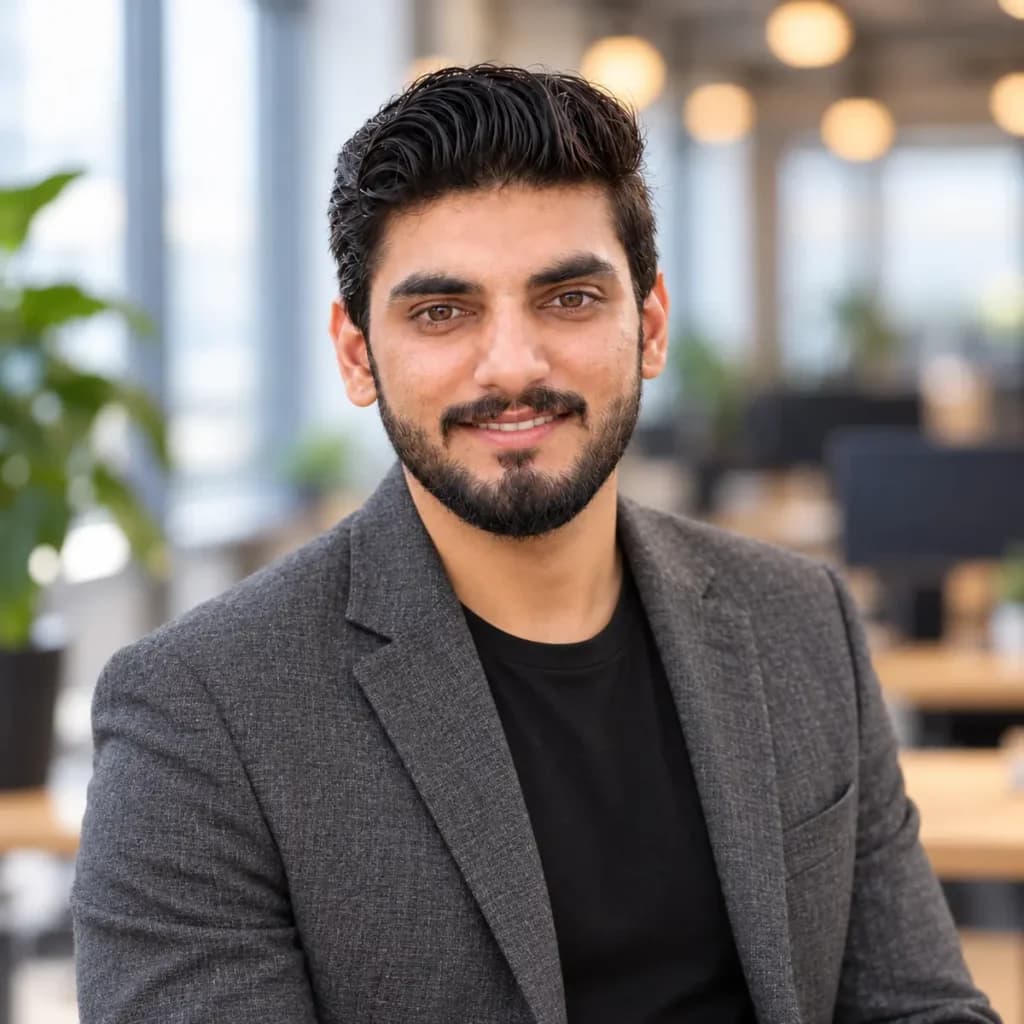
Restyles your own selfie into a professional office headshot without changing your face.
How To Use
- Upload one clear, front-facing selfie in good light.
- Paste the prompt and fill in the variables.
- Generate 3 to 4 versions and keep the one that looks most like you.
- 1.A selfie with no sunglasses and no hair across the eyes gives the best face match.
- 2.If the result looks too smooth, add “visible natural skin texture” to the prompt.
- 3.Ask for “a slightly wider smile” or “less teeth” as a follow-up instead of rewriting the whole prompt.
FAQs
Where this prompt breaks
Known failure modes we hit while testing, so you can spot them before they waste a run.
ChatGPT cropped to head and shoulders instead of chest-up
Nano Banana kept the lights and wall lamp fairly sharp, and Qwen left the monitors recognizable
Nano Banana drew a palm-like plant set in from the edge and added a wall lamp that wasn't requested
Qwen returned a noticeably smaller, softer image
Sources & further reading
Articles, websites, and tools this prompt draws on or recommends.
Related Prompts

No Perfect Match?
Generate a custom prompt built around your profession, AI model and goal.
Generate a Prompt →LinkedIn Headshot Prompt: Charcoal Blazer, Modern Office Description⌄
Most AI headshot tools hand you a face that looks like a stranger’s, which defeats the point of a profile photo. This prompt is built around the opposite goal: your real face stays untouched, and everything around it gets the polish. It sets a natural window-light portrait, a relaxed three-quarter pose, a textured blazer over a plain tee, and a softly blurred office with warm lights and a plant, the kind of setup you’d get from a good corporate photographer.
It’s written for professionals who need a believable LinkedIn photo fast, freelancers refreshing their profiles, and anyone who’s tired of stiff studio-backdrop headshots. The prompt locks identity first, then describes pose, wardrobe, light, lens and color in separate lines, so it’s easy to change one thing without breaking the rest.
What makes it useful:
- Identity instructions come first, so the model treats your face as fixed.
- Six variables let you swap outfit colors, background, expression and crop.
- The “avoid” line blocks the plastic-skin look that gives AI portraits away.
Send me your AI wisdom
One email a week: new prompts worth using, and what's changed across the models.
Leave a reply