Executive LinkedIn Headshot Master Prompt (Dark Studio Backdrop)
Turns your photo into a moody, high-end executive portrait centered suit-and-tie pose, dramatic vignette backdrop, soft rim lighting the authoritative counterpart to a brighter corporate headshot.
Variables
{Background_tone}{tie_color}Actual output, by model
Real output this exact prompt produced — not a description of what it might do.
[Image: centered, direct-facing female subject, arms crossed chest-to-waist, closed-mouth
confident smirk, charcoal suit, white shirt, black tie, wristwatch visible, dark charcoal
backdrop with soft radial vignette brighter behind head falling to near-black at corners,
no props/texture/logos. Portrait-oriented crop rather than true square.]
[Image: centered, direct-facing female subject, arms crossed, watch visible, charcoal suit,
white shirt, black tie, vignette backdrop matching spec, no props/logos. Expression reads
more neutral than "slight confident smirk." Portrait-oriented crop rather than true square.]
[Image: centered, direct-facing male subject, arms crossed, watch visible, navy suit
(compliant prompt allows navy or charcoal), white shirt, black tie, closed-mouth confident
smirk, vignette backdrop matching spec, no props/logos. Portrait-oriented crop rather than
true square.]
Which model runs this best
All three models correctly matched outfit, tie color, watch presence, and the vignette lighting pattern described in the prompt, with no invented props, logos, or background texture. Nano Banana’s expression and crop came closest to the written spec overall; Gemini’s expression read more neutral than the requested “slight confident smirk”; all three consistently defaulted to a portrait-oriented crop rather than the explicitly requested true square (1:1) format, which is worth a format-compliance note for future testers rather than a one-off miss.
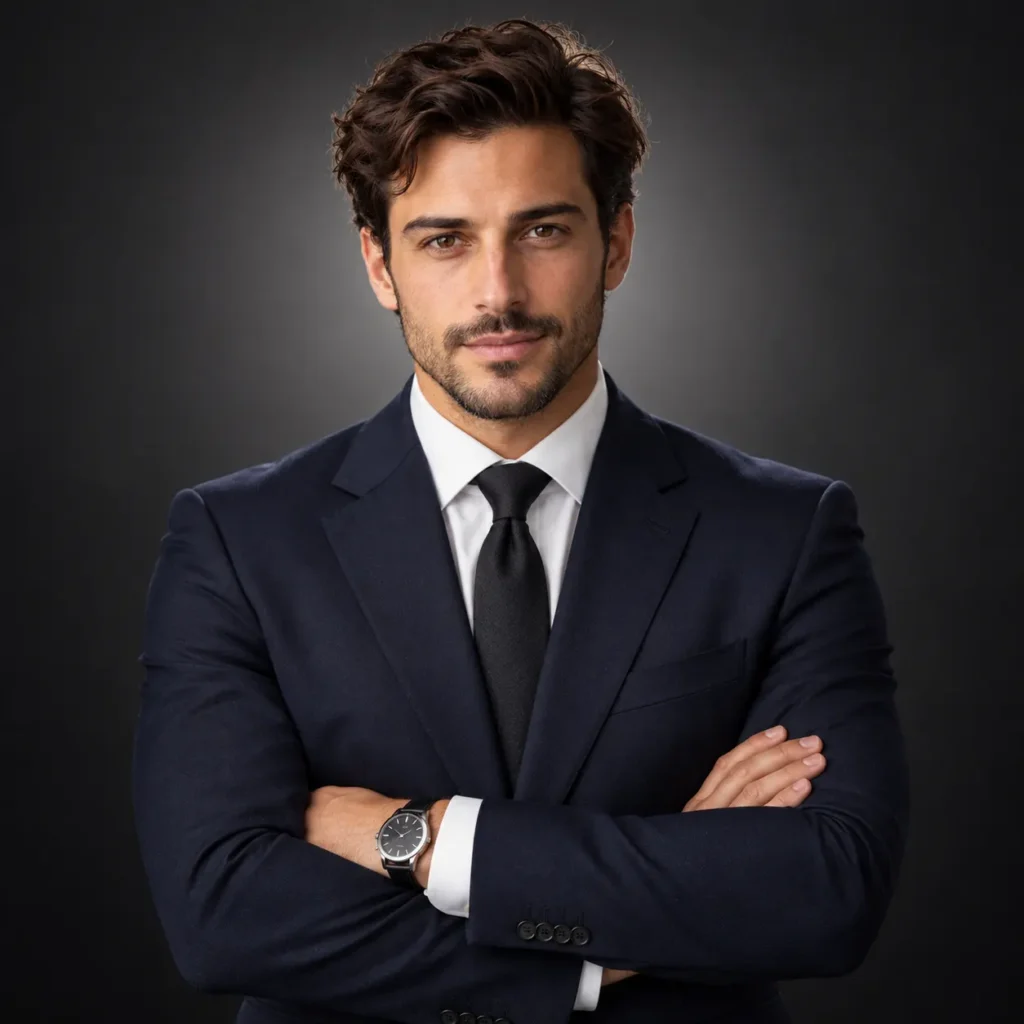
Turns one photo into a moody, authoritative executive portrait centered suit-and-tie pose, dark vignette backdrop, soft rim lighting.
How To Use
- Replace {background_tone} with your preferred dark palette (e.g. “charcoal gray,” “deep navy,” “near-black”)
- Replace {tie_color} with your preferred tie color, or “no tie” for an open-collar variant
- Attach a clear, well-lit, front-facing photo
- Paste into Chat GPT or Gemini
- 1.This expression choice is deliberate, not a default if your goal is maximum approachability (sales, client-facing, recruiting-adjacent roles), the brighter Corporate Brand Headshot prompt on this site is likely the better fit than this darker, more formal style
- 2.If the vignette comes out too subtle, add “strong vignette, noticeably darker corners” models sometimes undersell how much contrast “dramatic” actually implies
- 3.Always double-check the output for stray icons or watermark-style elements in the corners before publishing this is a known failure mode when a model has seen similar AI-generated reference images during training
FAQs
Where this prompt breaks
Known failure modes we hit while testing, so you can spot them before they waste a run.
Each model produced a portrait-oriented (taller-than-wide) crop instead of a true 1:1 square, despite the instruction being explicit and repeated ("Square framing" and "square format")
Sources & further reading
Articles, websites, and tools this prompt draws on or recommends.
Related Prompts

No Perfect Match?
Generate a custom prompt built around your profession, AI model and goal.
Generate a Prompt →Executive LinkedIn Headshot Master Prompt (Dark Studio Backdrop) Description⌄
Not every professional context wants the bright, approachable headshot a C-suite bio, a speaker page, or an executive LinkedIn profile often calls for something that reads as more authoritative than friendly. This prompt is built around that distinction deliberately: a centered, symmetric pose instead of an angled one, a closed, composed expression instead of an open grin, and a dark vignette backdrop with soft rim lighting instead of a flat bright color.
It’s built as the counterpart to a brighter corporate headshot style already on the site same underlying “professional AI headshot” category, intentionally opposite mood, so the choice between them is a real creative decision, not just a palette swap.
What makes it hold up:
- The expression is a deliberate trade-off, stated as one research on profile photo perception generally favors a toothy smile for likability, but a composed, closed-mouth expression reads as more authoritative, which is usually the actual goal for an executive-level photo
- The vignette and rim-light description is specific enough to actually produce the “spotlight” studio look, rather than a generic dark background that reads as flat or muddy
- {background_tone} and {tie_color} are separate variables, so the mood stays consistent while the exact palette can shift a deep navy backdrop with a burgundy tie reads very differently from charcoal with black, without changing the pose or lighting structure at all
One practical note: this style leans formal see the FAQ for when the brighter corporate version is the better call instead.
Send me your AI wisdom
One email a week: new prompts worth using, and what's changed across the models.
Leave a reply