LinkedIn Business Portrait Prompt: Seated Gray Blazer Look
Turns one selfie into a bright, seated business portrait in a heather-gray blazer and light blue shirt, set in a softly blurred modern office lobby.
Variables
{Crop}{seat}{pose}{expression}{blazer}{shirt}{trousers}{setting}{bokeh_tint}{aspect_ratio}Actual output, by model
Real output this exact prompt produced — not a description of what it might do.
[Image output, portrait, roughly 4:5, high resolution.] Man with dark, tousled wavy hair, light-to-medium stubble with a mustache, and a broad smile with teeth showing, eyes on the lens. Medium gray blazer with soft notch lapels, but the fabric reads as a flat, slightly fuzzy felt rather than a textured wool-blend. Light blue open-collar shirt, dark navy trousers. Seated in a taupe armchair with the torso angled about 45 degrees and the head turned back to the camera. One forearm runs along the chair arm and the hands are loosely clasped on the knee at lower left. Framing runs down to the thighs, so the hands and part of the chair are in frame. Background: tall windows blurred into pale teal and white vertical bands, with a soft table shape at the left. Hands look natural.
[Image output, portrait, roughly 4:5, fewer pixels than the other two.] Man with dark, tousled wavy hair, light stubble with a mustache, and a friendly smile with teeth showing, eyes on the lens. Dark charcoal blazer with a visible tweed or bouclé weave and soft notch lapels, over a light blue open-collar shirt with the buttons clearly visible, and navy trousers. Seated in a light beige, oatmeal-toned woven armchair. The torso is only slightly angled, closer to square-on, with a small head tilt. Hands are loosely clasped on the knee at lower left. Framing runs to the knees with the chair in frame. Background: tall windows blurred into cool blue and white with a green tint. Hands look natural.
[Image output, square, high resolution.] Man with dark, neatly swept wavy hair, light trimmed stubble with a mustache, and a broad smile with teeth showing, eyes on the lens. Heather-gray blazer with a visible woven texture and soft notch lapels, light blue open-collar shirt, dark navy trousers. Seated in a taupe armchair with a clear linen weave. The torso is angled and leaning forward, with the head turned toward the camera and the hands loosely clasped on the knee at lower left. Framing runs to the knees. Background: bright, high-key white windows and pale columns blurred together, with only hints of teal. Hands look natural.
Which model runs this best
Qwen followed the most lines: the requested 4:5 format, a torso angled about 45 degrees with the head turned back, a forearm along the chair arm with the hands clasped on the knee, and the clearest pale teal and white background. Its blazer came out as flat gray felt instead of a textured wool-blend. Gemini matched the blazer, the taupe linen chair and the broad smile best, but it returned a square image instead of 4:5 and washed the background almost fully to white. Chat GPT sat closest to square-on, with a darker charcoal blazer, a beige chair, a bluer background and the fewest pixels.
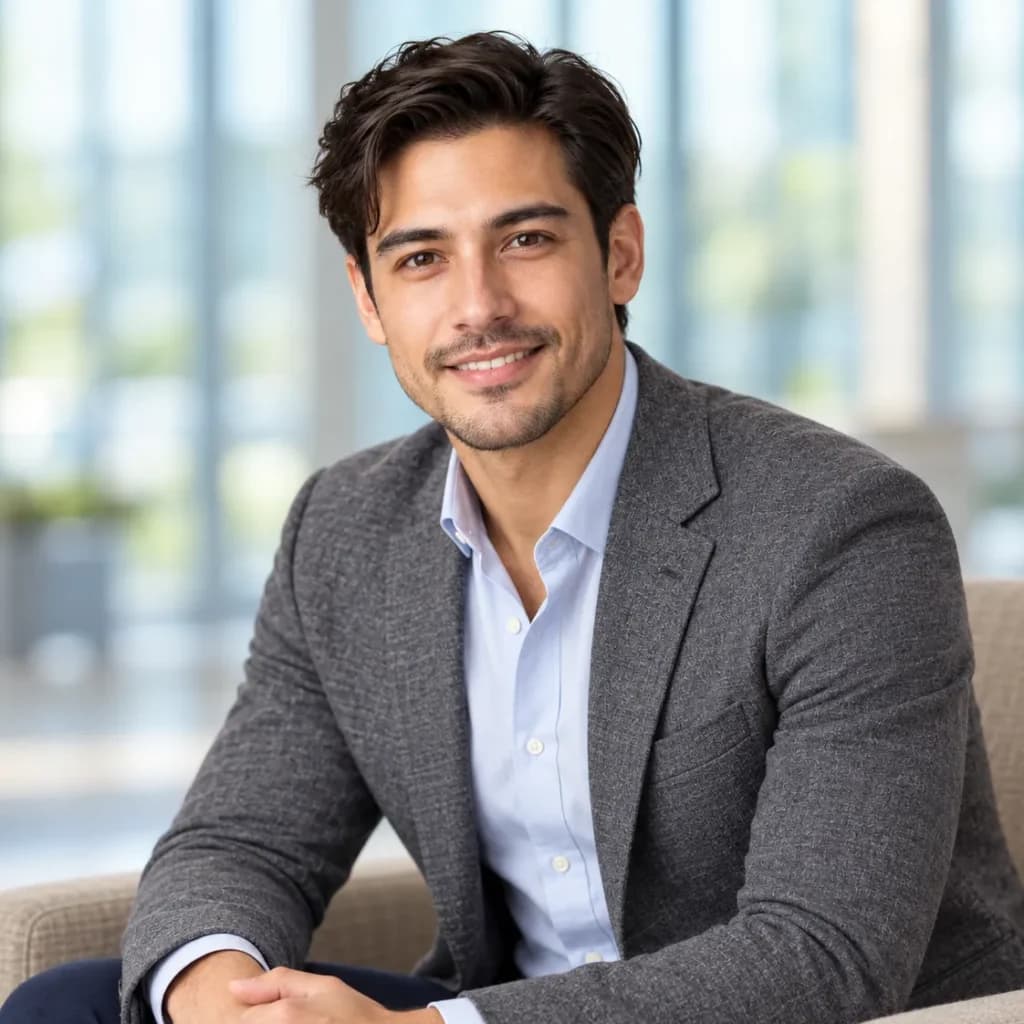
Restyles your selfie into a bright, seated business portrait in an office setting, keeping your face as it is.
How To Use
- Upload one sharp, front-facing selfie in even light.
- Paste the prompt and edit the variables for outfit, seat and setting.
- Generate several versions and check the hands, chair and collar before choosing.
- 1.If the seated pose looks awkward, set {pose} to “seated square to the camera with my hands folded in my lap” and regenerate.
- 2.Match {bokeh_tint} to your field. Cool teal tends to read as tech or finance, warm cream as coaching or real estate.
- 3.If the blazer looks flat, add “visible fabric weave” to the {blazer} value.
- 4.LinkedIn shows your photo small, so crop tighter after generating and keep the full seated frame for your website or About page.
FAQs
Where this prompt breaks
Known failure modes we hit while testing, so you can spot them before they waste a run.
Gemini returned a square image
All three framed lower than waist-up, to the thighs (Qwen) or the knees (Chat GPT, Gemini)
Chat GPT's torso was only slightly angled, closer to square-on
Chat GPT drew a darker charcoal tweed, and Qwen drew flat, fuzzy gray felt
Chat GPT's chair came out light beige or oatmeal
Chat GPT's background leaned cool blue with a green tint, and Gemini's was almost entirely white
Chat GPT returned noticeably fewer pixels than the other two
Sources & further reading
Articles, websites, and tools this prompt draws on or recommends.
Related Prompts

No Perfect Match?
Generate a custom prompt built around your profession, AI model and goal.
Generate a Prompt →LinkedIn Business Portrait Prompt: Seated Gray Blazer Look Description⌄
This prompt turns one selfie into a bright, seated business portrait for LinkedIn: a heather-gray blazer, a light blue shirt, a comfortable armchair and a softly blurred modern office behind you, with your own face left unchanged. It reads as relaxed and capable, the way a corporate-website photo should.
It’s built for sales professionals, advisors, real estate agents, consultants and managers who want a photo that feels friendly and established rather than stiff. Identity is locked first, then pose, wardrobe, setting, light and lens each get their own line, so you can change the chair, the room or the blazer color without touching your features.
What makes it useful:
- Ten variables, including seat, pose and background tint, so every result feels individual.
- A bright, high-key light recipe that flatters most skin tones and keeps the office clean and airy.
- Crop options for both a small LinkedIn avatar and a wider website bio.
Send me your AI wisdom
One email a week: new prompts worth using, and what's changed across the models.
Leave a reply