LinkedIn Open To Work Profile Picture Prompt: Yellow Blazer, Lilac Circle
Turns one selfie into a bold tonal portrait in a yellow blazer, cropped to a circle on a lilac canvas, with a short curved caption of your choice.
Variables
{Curved_text}{main_color}{canvas_color}{expression}{aspect_ratio}Actual output, by model
Real output this exact prompt produced — not a description of what it might do.
[Image output, square.] Lilac-purple canvas, more saturated than a soft lilac. The circle fills roughly 95% of the canvas width. Woman with shoulder-length wavy brown hair with lighter highlights, freckles and light eyes, glancing off to the left with a warm smile showing teeth, not an open laugh. Mustard double-breasted blazer with dark brown round buttons, four small cuff buttons and flap hip pockets, over a pale yellow crew-neck knit top. Hands held loosely together at waist level. The backdrop is mustard with a visible soft gradient, lighter at the upper left. White all-caps text "OPEN TO NEW ROLES!" is spelled correctly, medium weight, open spacing, curved up the lower right inside edge with the letter tops toward the center.
[Image output, square.] Soft lilac canvas, the closest of the three to the requested color. The circle takes up roughly 85% of the width. Woman with shoulder-length wavy brown hair and freckles, laughing with her mouth open and teeth showing, looking off to the left. Mustard double-breasted blazer with brown buttons and flap pockets. The sleeves look pushed up, so only a couple of cuff buttons show. Under it is a tan top only slightly lighter than the blazer. Hands together at waist level, framing runs down to the hips with dark trousers at the bottom edge. The backdrop is nearly flat mustard with very little gradient. White all-caps text "OPEN TO NEW ROLES!" is spelled correctly but heavy in weight and larger than "small", curved up the lower right edge.
[Image output, square, highest resolution of the three.] Pale grayish periwinkle canvas, cooler and grayer than lilac. The circle spans roughly 90% of the width and looks slightly taller than wide, closer to an oval than a perfect circle. Woman with long wavy light brown hair past the shoulders and thin round gold-rimmed glasses, laughing with teeth showing, glancing off to the left. Mustard double-breasted blazer with brown buttons, four small cuff buttons and flap pockets, over a pale cream-yellow top. Hands loosely together at waist level, body sits slightly right of center. The backdrop is mustard and nearly flat. White all-caps text "OPEN TO NEW ROLES!" is spelled correctly but thin in weight and small, curved at the lower right, and hard to read against the light mustard.
Which model runs this best
Chat GPT matched the most spec lines: a pale-tint top, a visible gradient lighter at the upper left, and white medium-weight text at the right size. It gave a closed warm smile instead of a laugh and drew the circle about 95% wide. Nano Banana got the laugh and the lilac canvas, but its top barely differed from the blazer, its text was heavy and its backdrop was flat. Qwen got the pale top and the laugh, but its canvas came out gray periwinkle, the circle looked oval and its thin white text was hard to read on the light mustard.
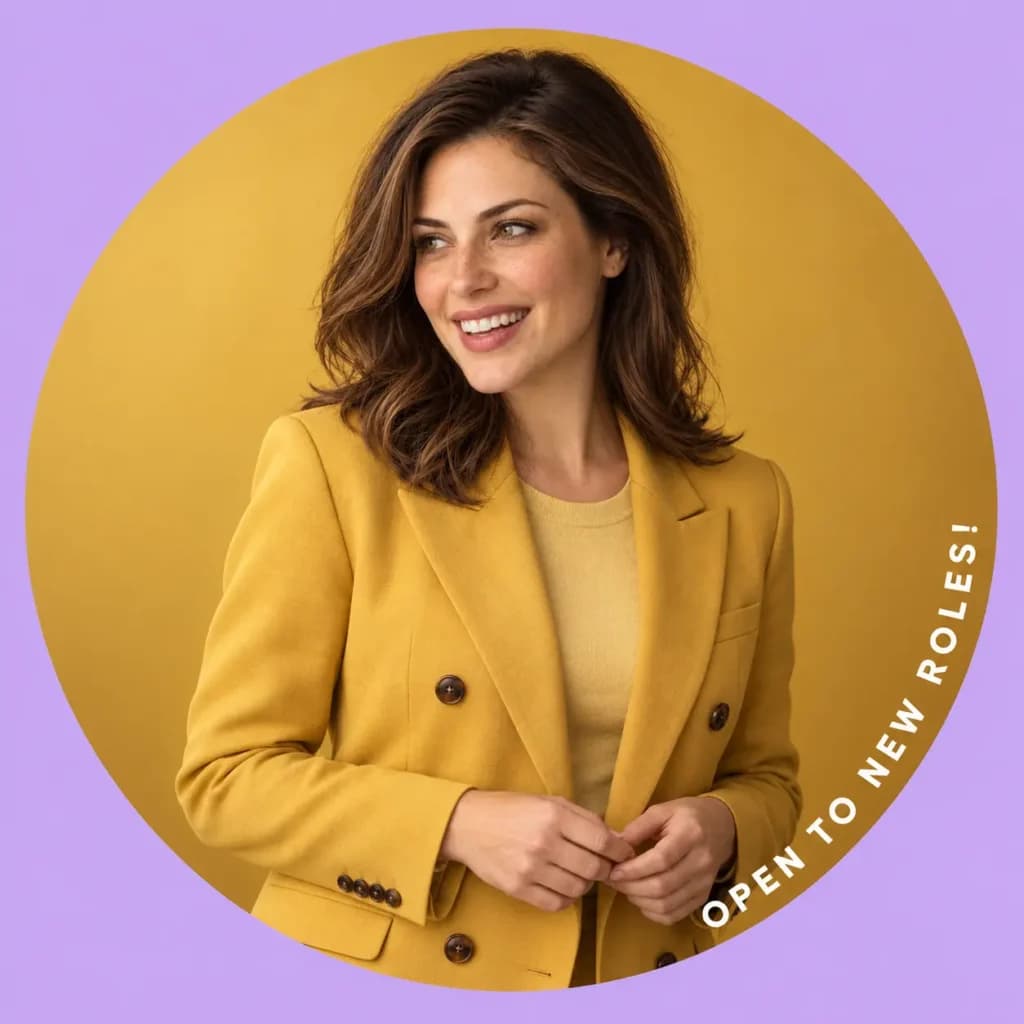
Restyles your selfie into a colorful circle portrait with a short curved caption you choose.
How To Use
- Upload one clear selfie with your face fully visible.
- Paste the prompt and edit the five variables, especially {curved_text}.
- Generate a few versions and check the caption spelling on each.
- 1.Keep the caption to 2 to 4 words in capitals. Short text survives small avatar sizes and gives the model less to get wrong.
- 2.If the spelling or curve is off, delete the Text paragraph, generate the portrait alone, then add the words in Canva with its Curve effect.
- 3.Pick a canvas color that contrasts with the main color. Same-family colors flatten the circle.
- 4.Platforms apply their own circle crop, so keep your face near the middle.
FAQs
Where this prompt breaks
Known failure modes we hit while testing, so you can spot them before they waste a run.
All three oversized it (Chat GPT roughly 95%, Qwen roughly 90%, Nano Banana roughly 85%), and Qwen's circle looked slightly taller than wide
Chat GPT returned a saturated purple-lilac and Qwen a grayish periwinkle
Chat GPT gave a warm closed-mouth-to-teeth smile with no open laugh
Nano Banana's top was only a shade lighter than the blazer
Nano Banana and Qwen returned a nearly flat backdrop
Nano Banana's text was heavy and large, and Qwen's was thin with low contrast against the backdrop
Nano Banana's sleeves looked pushed up, hiding most of the cuff buttons
Sources & further reading
Articles, websites, and tools this prompt draws on or recommends.
Related Prompts



No Perfect Match?
Generate a custom prompt built around your profession, AI model and goal.
Generate a Prompt →LinkedIn Open To Work Profile Picture Prompt: Yellow Blazer, Lilac Circle Description⌄
A plain headshot says who you are. A profile picture with a short caption says what you’re after. This prompt builds a bold, tonal portrait around your own face: a relaxed-fit blazer in one strong color, a matching seamless backdrop, and a candid, mid-laugh pose, all cropped into a clean circle on a contrasting canvas. A small curved line of white text follows the edge of the circle, and you decide what it says.
It’s written for job seekers, freelancers, creators and small business owners who want an avatar that stands out in a crowded comment section or search list. Identity comes first in the wording, so the model treats your face as fixed. Then scene, outfit, light and text each get their own block, which makes it easy to change one thing without breaking the rest.
What makes it useful:
- One text variable, with color, font and size locked so every version looks consistent.
- A tonal color story you can recolor with two variables.
- A circle layout built around how social platforms crop avatars.
Send me your AI wisdom
One email a week: new prompts worth using, and what's changed across the models.
Leave a reply